
Oscillatr Pro1.8.1 - App Store
You'll be able to see results in few seconds.
Publisher Description
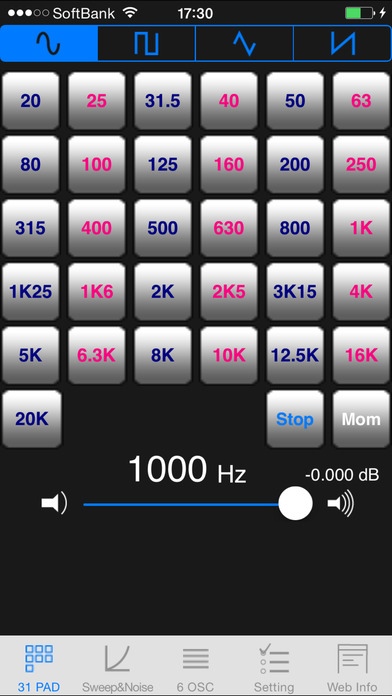
"Oscillatr Pro" transforms your iPhone/iPod touch into a powerful and functional test tone oscillator.
The test tone oscillator can produce tones within the audible field, from 20Hz to 20kHz.
It features a revolutionary keypad consisting of 31 bands and 1/3 octave, which allows you to directly access frequency distribution, and supports various graphic equalizers. You can access to a wide range of audible fields.
The application also contains functions that are suitable for searching characteristics of a room or howling spot, or tuning an instrument.
Features
Access to arbitrary frequencies from 20Hz to 20kHz using the 1/3 octave keypad.
Selectable waveforms: sine, square, triangle and saw waves.
Entering arbitrary frequencies allows you to access the frequency that you want to hear.
Access to 6 types of configurable frequencies.
Set start and stop frequency by using the AutoSweep function. Sweep steps can be set to 1Hz, 10Hz or 1/12 octave (chromatic) .
Play pink or white noise.
Features an in-app web browser. Access the web for information without switching applications.
(Available only when there is an Internet connection.)
Tools
1st screen "31 PAD"
Touch keypad of 31 bands and 1/3 octave to access arbitrary frequencies.
Tune frequency supporting various graphic equalizers.
Selectable waveforms: sine, square, triangle and saw waves.
2nd screen "Autosweep & Noise"
This mode features an AutoSweep function that allows you to search the characteristics of rooms or equipments quickly and widely.
"Arbitrary frequency play function"
Specify frequency accurately by touching the field (blue characters) where the frequency is displayed .
The frequency slider moves up to 1/12 octave (chromatic) and allows you to search from low to high frequency.
"AutoSweep function"
Auto sweep works by specifying the start and end point at 1Hz ,10Hz or 1/12 octave (chromatic)*.
Directly enter numbers for Start Freq (Start Frequency) and End Freq (End Frequency) by tapping on each field. The unit is Hz.
Select moving steps from 3 patterns.
"Noise function"
Play pink or white noise. You can play either pink or white noise while pressing the button.
3rd screen "6 OSC"
Features 6 frequency windows that you can set up and 6 sliders that quickly searches frequencies
(You can save frequency).
Moving the slider works as a tone oscillator with 1/12 octave (chromatic).
It carries Save and Load function of Setting. Users data can be saved in Bank A and Bank B.
4th screen Setting
Master Frequency Field: Set "Master Frequency".(Please use when calibrating)
By adjusting Calibration Factor Field and Calibration Factor Slider , you can calibrate the Master Frequency.
Calibration Factor Slider can be adjusted between -0.15% ~ +0.15%.
Test Tone Switch: Plays the digit of Master Frequency. Use it with Calibration Factor Slider when calibrating.
Portament switch:Activating this switch enables you to change frequencies smoothly.
Right Phase Invert Switch : Reverses the phase of right channel.
*If Phase Switch is On, you may have sound problem. Be careful. If Phase Switch is On ,you will see the Phase sign on "Tab bar" (screen bellow).
5th screen "Web info"
Features an in-app web browser. Access the web for information without switching applications. (Available only where there is an Internet connection.)
"Oscillatr Pro" Video Tutorial
"31 PAD" http://youtu.be/fTG96xwZh1s
"Sweep & Noise" http://youtu.be/x-EW1a9D31U
"6 OSC" http://youtu.be/JIpxDBGUYOM
"Setting" http://youtu.be/jEg55w_rAqc
Uchu Sokudo Lab
Follow us: https://twitter.com/uchulab
Requires iOS 5.1.1 or later. Compatible with iPhone, iPad, and iPod touch.
About Oscillatr Pro
The company that develops Oscillatr Pro is Uchu Sokudo Inc.. The latest version released by its developer is 1.8.1.
To install Oscillatr Pro on your iOS device, just click the green Continue To App button above to start the installation process. The app is listed on our website since 2010-02-24 and was downloaded 0 times. We have already checked if the download link is safe, however for your own protection we recommend that you scan the downloaded app with your antivirus. Your antivirus may detect the Oscillatr Pro as malware if the download link is broken.
How to install Oscillatr Pro on your iOS device:
- Click on the Continue To App button on our website. This will redirect you to the App Store.
- Once the Oscillatr Pro is shown in the iTunes listing of your iOS device, you can start its download and installation. Tap on the GET button to the right of the app to start downloading it.
- If you are not logged-in the iOS appstore app, you'll be prompted for your your Apple ID and/or password.
- After Oscillatr Pro is downloaded, you'll see an INSTALL button to the right. Tap on it to start the actual installation of the iOS app.
- Once installation is finished you can tap on the OPEN button to start it. Its icon will also be added to your device home screen.
Program Details
System requirements
Download information
Pricing
Version History
version 1.8.1
posted on 2010-02-24
Disclaimer
Official App Store Link
We do not host Oscillatr Pro on our servers. We did not scan it for viruses, adware, spyware or other type of malware. This app is hosted by Apple and passed their terms and conditions to be listed there. We recommend caution when installing it.
The App Store link for Oscillatr Pro is provided to you by apps112.com without any warranties, representations or guarantees of any kind, so access it at your own risk.
If you have questions regarding this particular app contact the publisher directly. For questions about the functionalities of apps112.com contact us.
